

Let’s start with the thing nobody at Google will ever say out loud on one of those “growth opportunity” calls: Google is a sales organization. Not a strategy partner. Not a neutral steward of your budget. A sales organization, with quotas, scorecards, and a product to move. And the product, more often than not, is you using more of the platform.
This wasn’t always the arrangement. Rewind far enough and the rep on the other end of the line was closer to a strategist. Someone who looked at the account, understood there was a goal behind it, and made suggestions meant to actually improve performance. You didn’t always agree with them, but you could have a real conversation, because they were oriented toward the same thing you were: making the account work.
That rep is largely extinct now. What you get today is a salesperson with a list of boxes to tick. Their job is not to move your numbers in the right direction. Their job is to get you to adopt features, and whether those features help your campaigns is, frankly, not their problem. Sometimes the feature is neutral. Sometimes it’s genuinely useful. And sometimes it will quietly set your budget on fire while the rep who talked you into it has already rotated off to torch someone else’s account.
Here’s the root of it, the thing every one of these conversations comes back to: Google does not understand your business. It treats the platform as one-size-fits-all, and it isn’t. Some clients live in the low funnel, where every dollar is chasing a conversion. Some are working the upper funnel, building awareness, playing a longer game. Every single client has a budget and a set of goals, and the entire job of a strategist, as opposed to a Google rep, is to make sure those goals get met. Google doesn’t know your goals. Google has a checklist.
Which brings us to the defaults, the settings quietly working against your goals right now, and why they’re costing you.
Automatically Applied Recommendations
We’ll start with the big one, because this is the setting that hands Google the keys to your entire account.
 Automatically Applied Recommendations does exactly what it sounds like. It lets Google make changes to your account without you. And these aren’t cosmetic tweaks, they’re the levers that fundamentally move performance, handed to an autopilot that has never met your client. It can pause your keywords. Add keywords. Adjust your bids. Adjust your budgets. Rewrite your ads. Flip your carefully chosen keywords to broad match. And on, and on, and on.
Read that back and sit with it for a second. You, the person hired to manage this account with intention, would be turning over bid decisions, budget decisions, and match-type decisions to an automated system that has no idea what your client’s margins are, what a good lead looks like, or why you made the choices you made. This needs to be turned off. Not eventually. Right now.
There are a small handful worth keeping, and I want to be fair here rather than reflexively anti-everything. Optimized Ad Rotation is the one I’d leave on. You could make a reasonable case for Conflicting Negatives too, but my strong preference is to review those conflicting negatives myself rather than hand the decision to Google. And that preference isn’t about control for its own sake. I’m the gatekeeper on those decisions because trusting Google’s AI to make them isn’t in my client’s interest or mine.
Because here’s what makes Google unique: the sheer volume of data flowing through it. The metrics, the dimensions, the endless angles you can slice performance from. That data is the whole point. It’s how you find where the money is leaking. Handing your account to Automatically Applied Recommendations doesn’t just risk bad changes, it robs you of the reason to go look at the data in the first place. The waste is in there. You just have to be willing to review it, and you can’t do that if you’ve outsourced your judgment to a toggle.
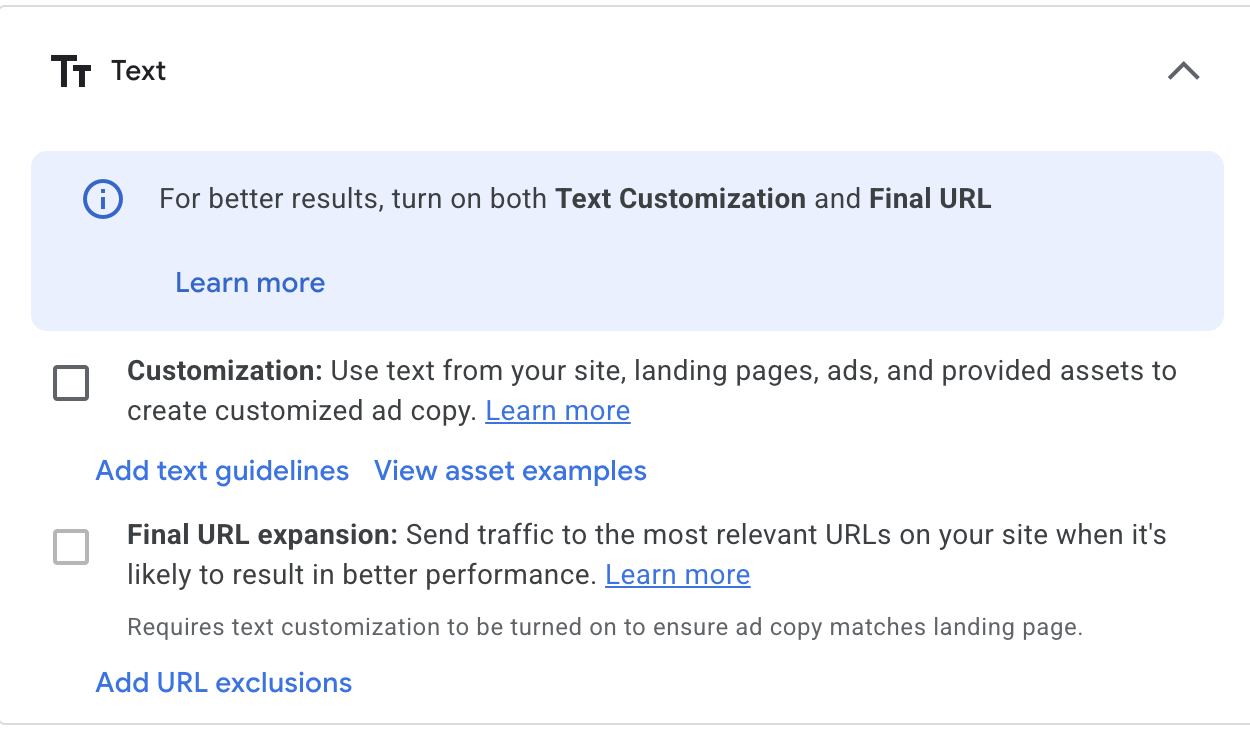 Final URL Expansion
This one is a perfect example of a setting that sounds helpful and quietly works against you. It’s available on both Performance Max and AI Max, and it comes wrapped in the friendliest word in Google’s vocabulary: “relevance.”
Here’s what Final URL Expansion actually does. It opens your campaign up to every page on your site. All of them. In the name of relevance, Google gets to decide where to send your traffic, and that includes non-transactional pages. If your client’s goal is to grow revenue through ads, and you’re now paying to send people to pages that were never built to convert, you are throwing money away. Full stop.
And I’m not speaking hypothetically. I’ve audited accounts, pulled the report on which pages were actually driving impressions thanks to Final URL Expansion, and found some genuinely cringeworthy stuff. Long-abandoned subdomains that were never intended for advertising. Orphan pages nobody even remembered existed.
There is a middle ground, to be fair. You can add a page feed and restrict the pool of pages Google is allowed to expand into. That may work. It may not. But it’s at least testable, so if you feel compelled to explore this, that’s the responsible way to do it. Although in most cases, if you already have a product feed running, this whole exercise is unnecessary, because the product feed is already defining the exact pages you want to drive users to. You solved the problem before Google offered to “solve” it for you.
 Text Customization
This one sits right next to Final URL Expansion in the interface, which is fitting, because it’s cut from the same cloth. Text Customization lets Google write your ad copy for you by scraping the landing page.
Hard no.
Google does not understand the brand. It doesn’t know there are specific terms that legal or the client has told you to never, ever use. It doesn’t know the USPs that absolutely must appear in the copy because they’re the entire reason the product wins. It’s scraping a page and guessing. There is no logical scenario in which you want an automated scraper generating brand-facing ad copy with none of the context that makes copy actually work. Leave it off.
Optimized Targeting
Now we move to audiences, and to a default that ships turned on across Demand Gen, Display (which is in the process of migrating over to Demand Gen anyway), and YouTube.
Optimized Targeting lets Google’s AI target outside the audience parameters you’ve set. You did the work. You built the audience. You defined who this campaign is supposed to reach. And this setting quietly grants Google permission to go find people beyond that definition, on the theory that it knows better.
In all my years doing this, I can’t recall a single time an “optimized” audience segment meaningfully outperformed the target audience I set on purpose. Not once that sticks in memory. What I do see, in case after case, is optimized targeting losing money. It’s spending your budget reaching people you specifically chose not to prioritize, and calling it an improvement.
Location Targeting
This might be the most ridiculous default in the entire platform, and almost nobody thinks to change it. It won’t hemorrhage your budget, but it does quietly waste some of it, and it should be off.
The default is set to “Presence or interest: People in, regularly in, or who’ve shown interest in your included locations.” The setting you almost always actually want is “Presence: People in or regularly in your included locations.” That word, “interest,” is where the money quietly disappears.
Let’s make it concrete. Say your target is the US. Your client only ships to the US. Your entire business is domestic. With that default left in place, you are now serving ads to anyone, anywhere on earth, who has merely researched the US and happens to be searching for your product. I have audited accounts with the “presence or interest” default humming along in the background, and pulled up audiences scattered across the globe. Ireland. India. New Zealand. People who were never, ever going to buy, soaking up spend.
If you genuinely want to reach people outside the US, that’s a real strategy, and it deserves its own campaign built for it deliberately. It does not deserve to happen by accident because of a default nobody turned off. Fix this one. Full stop.
Display Expansion (on Search Campaigns)
This is a campaign setting that quietly opens your Search campaigns up to the Google Display Network.
Let me be careful here, because I’m not knocking Display as a campaign type. It has its place. (Yes, it can also open your ads up to a lot of low-quality, spammy sites, but that’s a whole other article.) Display is fundamentally a visual, programmatic play. And that’s exactly the point: it deserves to be its own thing.
When you tack Display onto a Search campaign as an afterthought, you get the worst version of it. No deliberate targeting. No visuals you actually designed. No copy written for the format. Just your Search ads leaking out onto a network they were never built for. If you want to be on the GDN, and there are good reasons you might, then build a Display campaign where you set the targeting, you create the visuals, and you write the copy for that context. Don’t let it hitch a ride on Search.
Search Partners
I’ll end on one that’s genuinely optional. Unlike everything else on this list, Search Partners isn’t an automatic off.
Search Partners opens your ads up to Google’s “search partner network,” which means your ads can show outside of Google Search itself, across media sites, directories, e-commerce sites, and independent websites.
In most cases, if you’re budget-constrained and revenue-focused, I’d keep this off. Your dollars are better concentrated where you can see and control performance. But I won’t pretend it never works. Maybe ten percent of the time, I’ll see genuinely good performance out of Search Partners. So if you’ve got budget to spare and room to experiment, it’s worth a test. Just go in with your eyes open, watch the numbers, and be ready to shut it off the moment it stops earning its place.
The Common Thread
Look back over these settings and the pattern is hard to miss. Every one of them quietly moves a decision out of your hands and into Google’s, a decision that depends entirely on knowing the goal, the budget, and the business, none of which Google actually knows. They’re the choices that get easier for Google the moment you stop paying attention, and they tend to arrive dressed in the same reassuring language about growth, relevance, and “best practices.”
Google reps mask selling as actual strategy. That’s the job now. Your job is different. Your job is to remember that the account has a goal, that the goal has a budget behind it, and that nobody at Google is losing sleep over whether either one gets met. That part is on you. Which is exactly why the client hired you and not a checklist.
