2026

The Google Ads Bid Strategy Update Nobody Should Sleep On

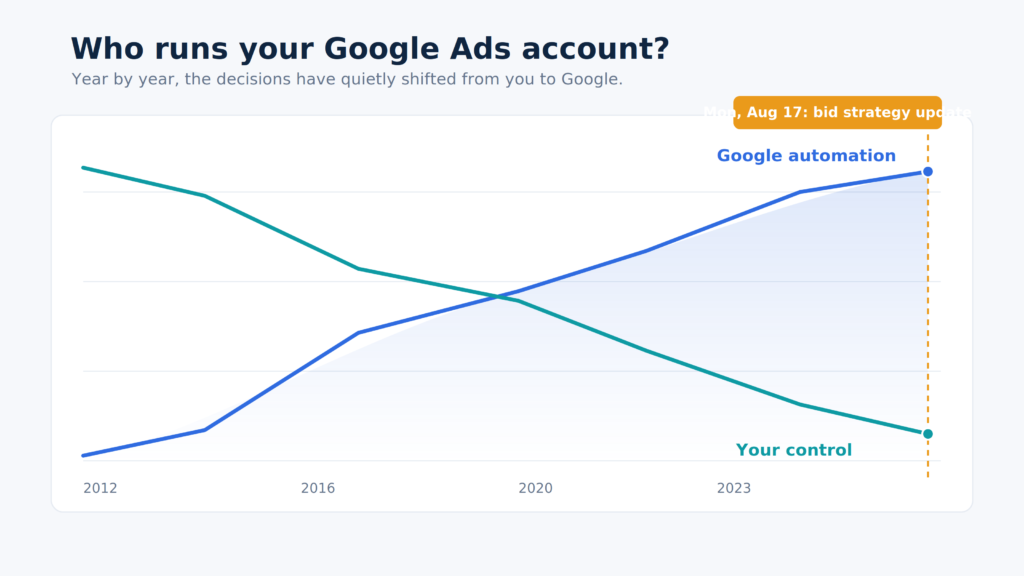
If you have managed Google Ads for any real length of time, you have watched the platform change underneath you so gradually that it is easy to miss how far it has actually moved. Not in the flashy, here-is-a-new-feature way. In the quiet, structural way. The way where you look up one day and realize the account you are managing operates on a completely different set of rules than the one you learned on. None of it arrived as a single dramatic announcement. It accumulated, one quiet change at a time, until the ground had moved completely.

On Monday, August 17, Google makes another one of these moves. And this one is a big deal, bigger than most of what came before it, because it does not just take another lever out of your hands. It changes the terms of the entire arrangement. The good news is that it is entirely manageable if you get ahead of it, so before we get to what happens Monday and what you should do about it, it is worth walking back through how we got here, because the change only makes sense as the latest step in a very long march.

The Long Handoff

Rewind to the manual bidding era and the job looked nothing like it does now. You set the bids. You set them by device, by location, by time of day. You segmented audiences to your heart’s content, sliced campaigns by match type, built single keyword ad groups so you could control relevance down to the individual term. You wrote ad schedules to protect budget on slow days. Every meaningful decision in the account was yours, and the platform mostly did what you told it to.

Then automation arrived, and to be fair, some of it worked. Smart Bidding could find efficiency that manual bidding, no matter how careful, simply could not. Plenty of the old manual tactics genuinely did stop earning their keep, and I said so at the time, back when I wrote about why SKAGS outlived their usefulness. At the time the trade felt reasonable. You gave up granular control, and in exchange the machine found performance you could not match by hand. That was the deal. Control for efficiency.
But that kind of deal has a quiet catch. Once the premise is that the machine knows best, every future decision defaults to Google instead of to you. So the levers kept leaving your hands, one at a time, each departure dressed up as a gift.

Match types stopped meaning what they said. Exact match stopped being exact. Close variants stopped being close. Phrase match loosened until it was barely a boundary at all. Every loosening was announced as smarter matching that would help you capture relevant traffic you were supposedly missing, and every one of them quietly transferred a little more control over intent from you to the system. You did the targeting. Google decided your targeting was a suggestion.

Broad match got pushed relentlessly at the same time, and that one had a price tag attached that nobody at Google likes to say out loud. More advertisers in more auctions means more competition, and more competition means higher CPCs. That is not a conspiracy theory, it is just how an auction works. The people who benefit from cramming more bidders into more auctions are not the bidders. And if you run brand campaigns, you felt this twice. Open your search terms report on any so-called brand campaign and you will find non-brand queries sitting right there, even against exact match brand keywords. Brand used to mean brand. You bid on your name, you showed up for your name, and if you wanted to appear for your exact brand term and nothing else, you could lock it down that way. That is gone. Match type erosion and the broad match push stopped letting brand stay brand, which means you are now paying more to defend your own name against traffic you never chose to bid on.

Then came the black boxes. Performance Max, where you feed in assets and budget and, for a long time, mostly took Google’s word for what happened inside. Getting any real visibility meant leaning on third party scripts just to see what the campaign was actually doing, until Google eventually started sharing more insights. And for all of it, Performance Max can be efficient, sure, but plain Shopping campaigns still beat it about half the time in my experience.

Then AI Max, getting pushed forward to replace Dynamic Search Ads, which was one of the genuinely efficient tools in the kit, retired before its replacement is anywhere near ready. Same pattern. A working thing gets swapped for something Google keeps far more opaque, the data harder to see, the mechanics harder to pin down, and the swap gets sold to you as progress. Worse, this one comes with a hook. AI search has swallowed a growing share of the Google real estate your ads used to compete for, and if you want to show up in those new placements, AI Max has to be enabled. So it is not really a choice. Either you sit those placements out entirely, or you opt into a campaign type that is not ready for primetime just to be present in them.

Look at all of it end to end and the direction never wavers. Every change moved a decision from your side of the table to Google’s. And through all of it, the justification held steady: trust the automation, because the automation delivers efficiency. That was the whole bargain. That was the thing that made giving up control feel worth it.

Which is exactly why Monday matters so much.

Why August 17 Is Different

Here is what changes on Monday, in plain terms.

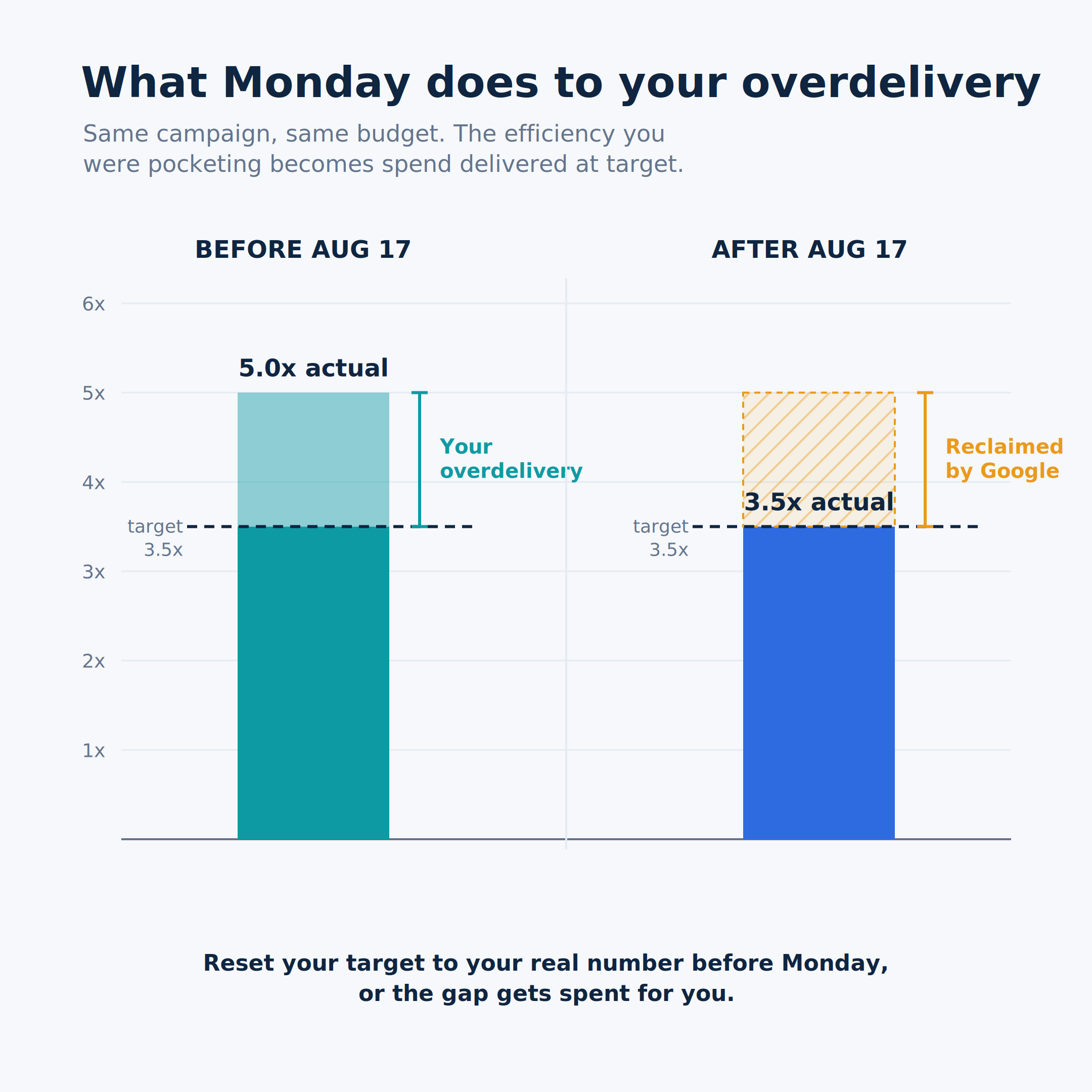
Right now, if a campaign is limited by budget and running a target-based strategy like Target CPA or Target ROAS, Smart Bidding has been allowed to quietly overdeliver. It finds the most efficient auctions and beats the target you set. Your $10 target CPA has been coming in at $5. Your 4x ROAS has been landing at 5.5x. For a lot of accounts, that overdelivery has been running for months.

But that gap between target and actual was rarely an accident, and this is the part Google’s framing skips right over. For a lot of us, the gap was a lever we used on purpose.

Here is how target-based bidding actually behaves. The tighter your target, the more conservatively the system bids. Set it too aggressive, a ROAS too high or a CPA too low, and the algorithm gets picky, enters fewer auctions, and leaves your budget unspent. Loosen the target, a lower ROAS or a higher CPA, and it bids up, competes for more, and spends.

So if your real goal was a 5x ROAS but setting the target there left half your budget sitting on the table, you learned to set it looser, say 3.5x, specifically so the campaign would actually spend.

And here was the payoff. Inside a budget-limited campaign, the system would then cherry-pick the best auctions and overdeliver anyway, carrying your actual ROAS back up near that 5x. You got both. Full budget spent, and efficiency better than the number you typed in.

The gap was not sloppiness. It was the mechanism that let you use the target as a throttle for spend while still hitting the performance you were really after.

That is the trick that changes on Monday. Google calls the overdelivery a defect and closes the gap. The campaign hitting $5 against a $10 target drifts up toward $10, and Google’s own documentation uses that exact example, so this is not me being cynical.

What it means in practice: the loosened target you set to unlock spend becomes your real result. That 3.5x you only entered to spend the budget is now the ROAS you get. The overdelivery that carried you back to 5x is gone.

So you have a choice to make. Keep the loose target and accept its efficiency as your real number, or tighten the target toward your true goal and give up some of the spend and volume that came with the gap.

Sit with what that does to the bargain. For a decade the pitch was: give us control, and the machine will find you efficiency. Fine. Many of us took that deal with our eyes open. But now the machine finds the efficiency, and Google reaches over and spends it. The surplus that automation was supposed to hand you gets quietly redirected back into spend you never asked for. This is not another lever leaving your hands. This is the platform reneging on the reason you gave up the levers in the first place.

Here is the encouraging part though. The mechanics are simple, and so is the fix. The efficiency you built does not have to vanish on Monday. It just stops being automatic, which means the edge now goes to whoever actually pays attention. That can absolutely be you, and the rest of this article is how.

And if you want a small tell about how carefully this got rolled out, here it is. When the announcement dropped, I brought a handful of specific technical questions to Google, the kind you can only ask if you actually run accounts. Which timing was it optimizing on, click or conversion? How would it handle portfolio strategies? How would it read ad group targets that override the campaign? What happens in a volatile, high average order value account where ROAS swings hard on a few big orders? Every answer came back broad, vague, and cheerfully reframed as a good thing. I do not say that to pile on the reps, I have a whole other article for that. I say it because when the people sent to represent a change this significant cannot answer basic questions about how it works, that tells you something about how much care went into it, and whose interests it was built to serve.

So do not wait for Google to make this comfortable for you. It will not. It applies the change automatically, it will not touch your targets or your budgets on your behalf, and it leaves the cleanup entirely on your desk. Here is how to handle it.

How to Actually Prepare

Find the campaigns that are beating their targets. This whole thing only bites the overperformers. Pull your budget-limited campaigns running Target CPA, Target ROAS, or Target CPC for Demand Gen, and compare each target to its last 30 days of actual performance. The ones delivering well inside their target are the ones about to drift. The ones already sitting at or above target are fine. Make the list before the weekend is out.

Reset the target toward your actuals, at the level where the target actually lives, and do it in steps. For a campaign hitting $5 against a $10 target, moving the target down toward $5 preserves what you had. Two traps to avoid. First, where you make the edit. If your strategy is a portfolio, the default target lives at the portfolio level, not on the campaign. And if any ad groups carry their own target overrides, those supersede whatever the strategy sets, campaign or portfolio, so an edit at the strategy level never touches them and those ad groups will drift anyway. Fix the target wherever the operative one actually sits. Second, do not swing it all at once. Move the target toward your actual in increments over a few adjustments rather than one big jump, because large sudden changes can throw a strategy that has been running smoothly into a relearning period you do not want right now.

Take extra care with high AOV accounts. If a handful of large orders can swing your ROAS dramatically, then your 30 day actual might be propped up or dragged down by a few outlier sales rather than reflecting what the account does on a normal day. Do not anchor your new target to a distorted number. Pull a longer, more representative window, set aside the obvious anomalies, and base the target on typical performance instead. Then move toward it in steps, checking as you go, exactly as above.

Do not overreact to the first few days. Performance will wobble as the system settles, especially anywhere with a long conversion cycle. That early noise is not signal. Resist the urge to make a second round of changes off it, and give it a conversion cycle or two before you judge anything.

Resist the reflexive levers. Do not slap on bid caps or data exclusions as a panic response. Google advises against it and it tends to create more volatility, not less. And this is a bad week to kick off a major migration, like moving to value-based bidding, right on top of the change. Let one thing settle before you start another.

Decide what you actually want, on purpose. Here is the real choice in front of you. If you would genuinely take more volume at a slightly looser efficiency, then this change is not stealing anything from you, it is just forcing a conversation about your targets that was probably overdue. Set the target where your real goal is and own it. If Maximize Conversions or Maximize Conversion Value fits the account better than a target you keep babysitting, this is a fine moment to make that call deliberately. The point is that the number should reflect a decision you made, not a default Google drifted you into.

Then expect the next one. The real lesson of the last decade is that the platform will keep changing underneath you, and the drift always runs in the same direction. This update will not be the last curveball Google throws, so the advantage goes to whoever sees the next one coming.

The Bottom Line

None of this means ripping out Smart Bidding or distrusting every tool in the platform. The tools still perform when you hold them to your terms instead of Google’s. The deal just shifted, and you are the one who has to catch it when it does. Check your targets against actuals, question any number that moves on its own, and get in there before Monday.

The Google Ads Bid Strategy Update Nobody Should Sleep On Read More ยป

The Hidden Default Settings Quietly Killing Your Google Ads Campaigns

Let’s start with the thing nobody at Google will ever say out loud on one of those “growth opportunity” calls: Google is a sales organization. Not a strategy partner. Not a neutral steward of your budget. A sales organization, with quotas, scorecards, and a product to move. And the product, more often than not, is you using more of the platform.

This wasn’t always the arrangement. Rewind far enough and the rep on the other end of the line was closer to a strategist. Someone who looked at the account, understood there was a goal behind it, and made suggestions meant to actually improve performance. You didn’t always agree with them, but you could have a real conversation, because they were oriented toward the same thing you were: making the account work.

That rep is largely extinct now. What you get today is a salesperson with a list of boxes to tick. Their job is not to move your numbers in the right direction. Their job is to get you to adopt features, and whether those features help your campaigns is, frankly, not their problem. Sometimes the feature is neutral. Sometimes it’s genuinely useful. And sometimes it will quietly set your budget on fire while the rep who talked you into it has already rotated off to torch someone else’s account.

Here’s the root of it, the thing every one of these conversations comes back to: Google does not understand your business. It treats the platform as one-size-fits-all, and it isn’t. Some clients live in the low funnel, where every dollar is chasing a conversion. Some are working the upper funnel, building awareness, playing a longer game. Every single client has a budget and a set of goals, and the entire job of a strategist, as opposed to a Google rep, is to make sure those goals get met. Google doesn’t know your goals. Google has a checklist.

Which brings us to the defaults, the settings quietly working against your goals right now, and why they’re costing you.

Automatically Applied Recommendations

We’ll start with the big one, because this is the setting that hands Google the keys to your entire account.

Automatically Applied Recommendations does exactly what it sounds like. It lets Google make changes to your account without you. And these aren’t cosmetic tweaks, they’re the levers that fundamentally move performance, handed to an autopilot that has never met your client. It can pause your keywords. Add keywords. Adjust your bids. Adjust your budgets. Rewrite your ads. Flip your carefully chosen keywords to broad match. And on, and on, and on.
Read that back and sit with it for a second. You, the person hired to manage this account with intention, would be turning over bid decisions, budget decisions, and match-type decisions to an automated system that has no idea what your client’s margins are, what a good lead looks like, or why you made the choices you made. This needs to be turned off. Not eventually. Right now.

There are a small handful worth keeping, and I want to be fair here rather than reflexively anti-everything. Optimized Ad Rotation is the one I’d leave on. You could make a reasonable case for Conflicting Negatives too, but my strong preference is to review those conflicting negatives myself rather than hand the decision to Google. And that preference isn’t about control for its own sake. I’m the gatekeeper on those decisions because trusting Google’s AI to make them isn’t in my client’s interest or mine.

Because here’s what makes Google unique: the sheer volume of data flowing through it. The metrics, the dimensions, the endless angles you can slice performance from. That data is the whole point. It’s how you find where the money is leaking. Handing your account to Automatically Applied Recommendations doesn’t just risk bad changes, it robs you of the reason to go look at the data in the first place. The waste is in there. You just have to be willing to review it, and you can’t do that if you’ve outsourced your judgment to a toggle.

ย Final URL Expansion

This one is a perfect example of a setting that sounds helpful and quietly works against you. It’s available on both Performance Max and AI Max, and it comes wrapped in the friendliest word in Google’s vocabulary: “relevance.”

Here’s what Final URL Expansion actually does. It opens your campaign up to every page on your site. All of them. In the name of relevance, Google gets to decide where to send your traffic, and that includes non-transactional pages. If your client’s goal is to grow revenue through ads, and you’re now paying to send people to pages that were never built to convert, you are throwing money away. Full stop.

And I’m not speaking hypothetically. I’ve audited accounts, pulled the report on which pages were actually driving impressions thanks to Final URL Expansion, and found some genuinely cringeworthy stuff. Long-abandoned subdomains that were never intended for advertising. Orphan pages nobody even remembered existed.

There is a middle ground, to be fair. You can add a page feed and restrict the pool of pages Google is allowed to expand into. That may work. It may not. But it’s at least testable, so if you feel compelled to explore this, that’s the responsible way to do it. Although in most cases, if you already have a product feed running, this whole exercise is unnecessary, because the product feed is already defining the exact pages you want to drive users to. You solved the problem before Google offered to “solve” it for you.

Text Customization

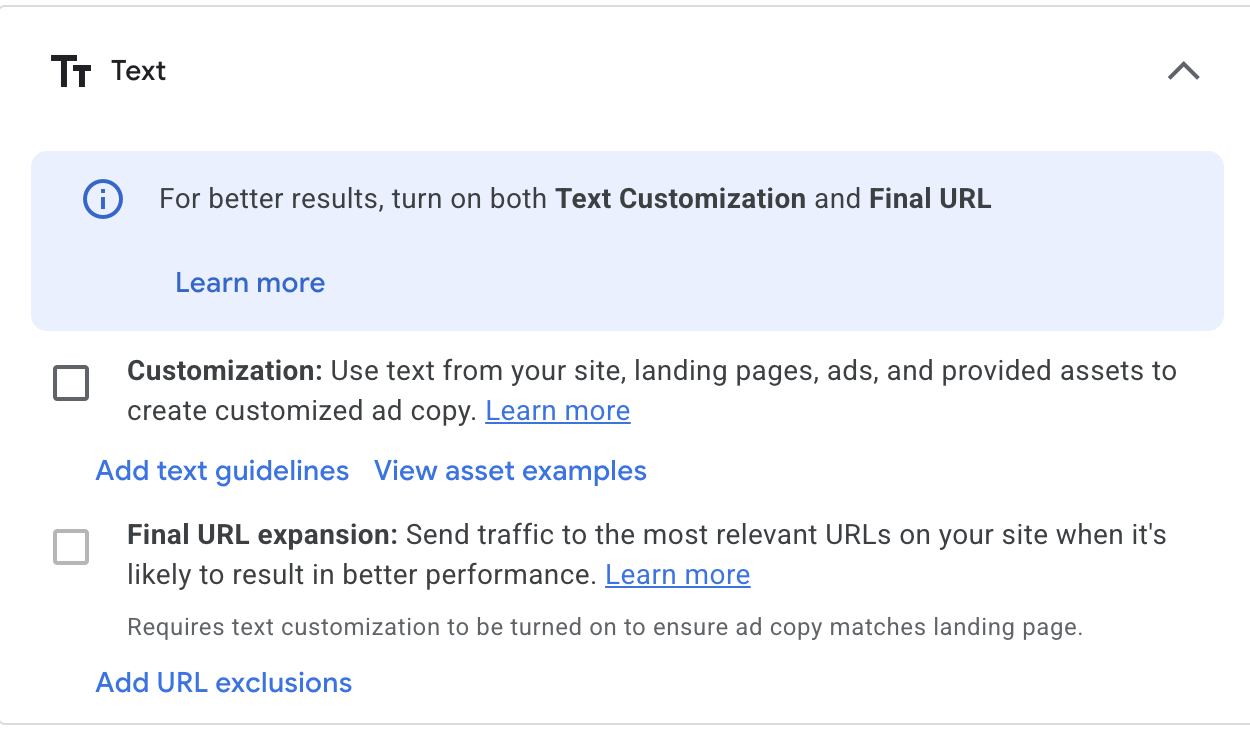
This one sits right next to Final URL Expansion in the interface, which is fitting, because it’s cut from the same cloth. Text Customization lets Google write your ad copy for you by scraping the landing page.

Hard no.

Google does not understand the brand. It doesn’t know there are specific terms that legal or the client has told you to never, ever use. It doesn’t know the USPs that absolutely must appear in the copy because they’re the entire reason the product wins. It’s scraping a page and guessing. There is no logical scenario in which you want an automated scraper generating brand-facing ad copy with none of the context that makes copy actually work. Leave it off.

Optimized Targeting

Now we move to audiences, and to a default that ships turned on across Demand Gen, Display (which is in the process of migrating over to Demand Gen anyway), and YouTube.

Optimized Targeting lets Google’s AI target outside the audience parameters you’ve set. You did the work. You built the audience. You defined who this campaign is supposed to reach. And this setting quietly grants Google permission to go find people beyond that definition, on the theory that it knows better.

In all my years doing this, I can’t recall a single time an “optimized” audience segment meaningfully outperformed the target audience I set on purpose. Not once that sticks in memory. What I do see, in case after case, is optimized targeting losing money. It’s spending your budget reaching people you specifically chose not to prioritize, and calling it an improvement.

Location Targeting

This might be the most ridiculous default in the entire platform, and almost nobody thinks to change it. It won’t hemorrhage your budget, but it does quietly waste some of it, and it should be off.

The default is set to “Presence or interest: People in, regularly in, or who’ve shown interest in your included locations.” The setting you almost always actually want is “Presence: People in or regularly in your included locations.” That word, “interest,” is where the money quietly disappears.

Let’s make it concrete. Say your target is the US. Your client only ships to the US. Your entire business is domestic. With that default left in place, you are now serving ads to anyone, anywhere on earth, who has merely researched the US and happens to be searching for your product. I have audited accounts with the “presence or interest” default humming along in the background, and pulled up audiences scattered across the globe. Ireland. India. New Zealand. People who were never, ever going to buy, soaking up spend.

If you genuinely want to reach people outside the US, that’s a real strategy, and it deserves its own campaign built for it deliberately. It does not deserve to happen by accident because of a default nobody turned off. Fix this one. Full stop.

Display Expansion (on Search Campaigns)

This is a campaign setting that quietly opens your Search campaigns up to the Google Display Network.

Let me be careful here, because I’m not knocking Display as a campaign type. It has its place. (Yes, it can also open your ads up to a lot of low-quality, spammy sites, but that’s a whole other article.) Display is fundamentally a visual, programmatic play. And that’s exactly the point: it deserves to be its own thing.

When you tack Display onto a Search campaign as an afterthought, you get the worst version of it. No deliberate targeting. No visuals you actually designed. No copy written for the format. Just your Search ads leaking out onto a network they were never built for. If you want to be on the GDN, and there are good reasons you might, then build a Display campaign where you set the targeting, you create the visuals, and you write the copy for that context. Don’t let it hitch a ride on Search.

Search Partners

I’ll end on one that’s genuinely optional. Unlike everything else on this list, Search Partners isn’t an automatic off.

Search Partners opens your ads up to Google’s “search partner network,” which means your ads can show outside of Google Search itself, across media sites, directories, e-commerce sites, and independent websites.

In most cases, if you’re budget-constrained and revenue-focused, I’d keep this off. Your dollars are better concentrated where you can see and control performance. But I won’t pretend it never works. Maybe ten percent of the time, I’ll see genuinely good performance out of Search Partners. So if you’ve got budget to spare and room to experiment, it’s worth a test. Just go in with your eyes open, watch the numbers, and be ready to shut it off the moment it stops earning its place.

The Common Thread

Look back over these settings and the pattern is hard to miss. Every one of them quietly moves a decision out of your hands and into Google’s, a decision that depends entirely on knowing the goal, the budget, and the business, none of which Google actually knows. They’re the choices that get easier for Google the moment you stop paying attention, and they tend to arrive dressed in the same reassuring language about growth, relevance, and “best practices.”

Google reps mask selling as actual strategy. That’s the job now. Your job is different. Your job is to remember that the account has a goal, that the goal has a budget behind it, and that nobody at Google is losing sleep over whether either one gets met. That part is on you. Which is exactly why the client hired you and not a checklist.

The Hidden Default Settings Quietly Killing Your Google Ads Campaigns Read More ยป

A man with eyeglasses looks surprised while reading. His expression shows shock and disbelief.

What Your Google Ads Rep Won’t Tell You

If you’ve managed Google Ads professionally for any length of time, you know the email. It shows up from a rep you’ve never met, all warmth and enthusiasm, wanting to find a time to “unlock growth opportunities in your account.” Most of the time you already know how the call is going to go before you’ve even replied. Now and then, though, you get a rep who genuinely wants to understand the account, and those calls are a completely different experience. This piece is mostly about the other kind.

I’ve spent about two decades in paid media. I’ve watched Google Ads evolve from a scrappy keyword auction into the sprawling, AI-drenched machine it is today. And through all of it, one constant has held as reliable as gravity: the Google Ads rep experience is a slot machine, and you almost never hit the jackpot.

Let me be clear up front. This isn’t a knock on Google Ads, the platform. The tools are powerful. The reach is unmatched. The experiments feature alone is worth its weight in gold (more on that later). This is about the people Google sends to “help” us, and the strange theater we’re all forced to perform together.

Pull up a chair. Let’s talk about the reps.

The 99% Who Never Learn the Brand

Here’s the ratio, in my experience: roughly 99% of the time, you get a rep who never once tries to understand the actual business.

To be fair, they do look at the campaigns. They have to, because that’s where the recommendations come from. That’s how you get the greatest hits: “Why isn’t this enabled?” “Why aren’t you running Demand Gen?” “I see you’ve got Final URL Expansion turned off.” They’ve scanned your settings. They’ve run the account through whatever internal checklist got handed to them that morning. What they have not done, and will not do, is ask a single question about the business those settings exist to serve.

They don’t know that half the “conversions” they want to optimize toward are junk leads the client already complained about. They don’t know the real margin on the products they’re pushing you to bid harder on, or that the high-volume campaign they love is the one quietly losing money. They don’t know the account’s true CPA ceiling, the seasonality that makes this month look soft on purpose, or which “underperforming” campaign is actually doing exactly what the client asked it to do. They don’t know why that campaign is capped, or why you paused the thing they’re now urging you to turn back on. They see a toggle in the off position and treat it like a smoking gun, never once considering that a professional turned it off on purpose, for a reason, backed by data.

The settings are not the strategy. But to the 99%, the settings are the entire conversation.

And then, once in a very great while, so rarely you’ll remember their name years later, you get the good one. A rep who asks about the business model before the first recommendation ever leaves their mouth. Who says, “Huh, that’s a weird conversion pattern, let’s dig into it.” Who treats you like a partner instead of a checklist. You start to think maybe the system works after all.

Which brings us to the cruelest part.

They Rotate the Unicorns Out on a Schedule

I want to be honest about how rare the good ones are, because “rare” undersells it. In twenty years, I can count the genuinely excellent reps on one hand and still have fingers left over. They are unicorns. Not “good day at the office” unicorns. Actual, mythical, once-in-a-blue-moon unicorns.

So of course Google rotates them out.

Reps cycle roughly every quarter, which means the moment you finally find a partner who understands your client’s goals, roadblocks, and budget caps, a countdown clock starts ticking. And you know exactly when it runs out, because the rep tells you themselves. A breezy “I’m rotating off your account, but I’m handing you to someone great!” email that reads like a breakup letter with a forwarding address.

Sometimes the good rep even does the responsible thing on the way out. They brief the replacement, they loop you in, they assure you the new person is fully up to speed on the account and its history. And you believe it, right up until the first meeting, when it becomes obvious the new rep retained exactly none of it. Whatever got handed off went in one ear and straight out the other.

So in practice you’re starting from zero anyway, with someone who behaves as though their mere presence will transform the account. They don’t know the goals. They don’t know the constraints. They don’t know about the two years of testing that got you here. But they are eager. They are pushy. They have a list of boxes they’ll be graded on come review time, and by God, they are going to check them on your dime.

This is the rep who lectures you, you with your years of hands-on experience, about how you’re “missing out” on Final URL Expansion. About how you really need to turn on AI Max, today, immediately, no we can’t wait for a test. About how you simply have to be running Demand Gen, the campaign type every single rep on the planet is currently trying to jam down our throats like it’s the cure for something.

They will preach at you about “best practices” as though they invented the concept and you’ve been asleep at the wheel since 2009.

Which brings us to the phrase itself.

There Is No Such Thing as “Best Practices”

Let’s retire this term together, right now.

“Best practices” is not a real thing. It’s a buzzword, a rhetorical Trojan horse designed to make a one-size-fits-all recommendation sound like settled science. I once worked at an agency that banned the phrase outright, because we all understood the truth: it’s marketing dressed up as expertise. Internally, we called them “proven methods” instead, because at least that implied someone, somewhere, had actually tested the thing and watched it perform.

Here’s the question no rep wants you to ask out loud. Do these recommendations actually work, or do they just move more money into Google’s pocket? Most of the time, it’s the latter. And the thing they conveniently leave out of every deck is the single most important truth in all of paid media:

Google Ads is not one-size-fits-all.

Read that again, because every pushy rep on earth is betting that you’ll forget it.

Every company has different goals. A lead-gen client and an e-commerce client are not playing the same sport. Every company has a different budget. What’s pocket change for one account is the entire quarter for another. Every company has a different competitive landscape, a different margin structure, a different definition of what a “win” even looks like. What crushes it for one account can quietly hemorrhage money for the next, and the rep pushing the recommendation has zero skin in that outcome. If it tanks, they’ve already rotated off. You’re the one left explaining the spend to a client.

So a recommendation isn’t a fact. It’s a hypothesis. And a good strategist doesn’t take hypotheses on faith, no matter how confidently they’re delivered or how many times the word “proven” gets attached to them. A good strategist tests them, using one of the genuinely excellent tools Google built right into the platform: the experiments feature.

This is the part I wish more reps understood, because it would make all of us allies instead of adversaries. I am not anti-recommendation. I am pro-evidence. So run the experiment. Split the traffic. Let the data settle the argument the way arguments in this industry are supposed to be settled. If Final URL Expansion is the magic bullet the rep swears it is, the numbers will say so, and I will happily eat my words with a spoon. But nine times out of ten, when you actually put “best practice” to the test, it turns out to mean “best for Google.”

The Rep Who Goes Around You

Now we arrive at the truly special one. Every so often you get a rep who does not appreciate the word “no.” And rather than accept it like a professional, they get creative.

They go around you. They email your client directly, quietly leaving you off the thread, apparently convinced that a little backchannel maneuvering will override your expertise, the very expertise your client is paying good money for you to provide.

Let me spell out why this is such a bad move, for any rep who might be reading.

It’s divisive. It’s manipulative. And it ignores why the strategist is there in the first place. A client hires an agency the way you hire a lawyer: so you have someone who knows the rules, protects your interests, and does the talking on your behalf. A Google rep emailing the client directly is the opposing party trying to negotiate around your attorney. It’s not just bad form, it’s the exact move that makes people trust you less, not more. The client hired representation so they wouldn’t have to sit across the table alone.

Nobody at that table walks away thinking, “Wow, what a compelling rep.” They walk away thinking, “Why is the Google Ads rep trying to manage around the expert we hired?”

So Here’s How to Actually Be a Good Rep

I don’t want to leave this on a pile of complaints, because I have met the good ones, and they prove it’s possible. So here’s the whole playbook, free of charge.

Listen. Not “wait for your turn to pitch.” Actually listen.

Care about the business. Learn what the client sells, who they’re up against, and what winning looks like for them, not for your quarterly scorecard.

Ease up on the box-checking. We can tell. We can always tell. The blatant scramble to hit your internal metrics is the least persuasive thing you can do in a meeting.

Stop acting like a used car salesman. Cheap sales tactics don’t move accounts. They just make you, and by extension Google, look cheap. And the strategists on the other end of the call have very long memories.

The best reps I’ve ever worked with understood something the pushy ones never will. Our goals aren’t actually opposed. When the account performs, everybody wins: the client, the strategist, and yes, Google too. You don’t have to strong-arm us into that outcome. You just have to be a real partner in getting there.

The unicorns already know this. Here’s hoping Google figures out how to keep a few of them around longer than a quarter.


What’s your worst Google Ads rep story? I know you have one. Drop it in the comments. Misery loves a well-optimized company.


What Your Google Ads Rep Won’t Tell You Read More ยป

Magic Touch Media Digital Marketing | SEO | PPC | CRO
Scroll to Top